This is not actually secret anymore but when I was searching on Google the other day, I found out that many people don't know how to rearrange or edit their apps. So then I figured that I should answer this frequently asked question.
What you Should Do if your Device Crashes
Once your apple device starts getting old after a few months
there are more chances that your device will ‘freeze.’ The term freeze here
means that your device gets stuck wherever it is and you can’t do anything
else. The home button will stop working, the sleep button will stop working,
and the devices touch screen will become disabled. There is only one possible
way to fix this problem.
The New iPhone 5 Rumors and Expectations
According to latest discussions, Apple is supposed to launch their newest iPhone either in the month of September or October, 2012. The iPhone 5 was rumored to be released in 2011 but instead Apple released the iPhone 4S and now most of the users are expecting a lot of new technology in the iPhone 5.
How to use VPN on iPhone, iPod, and iPad
Virtual Private Network is a safe and hidden way of surfing
the net in a safe and private way. VPN helps you to surf the net in anonymity,
and without risks of web attacks and hacking.
The use of VPN is especially efficient while using an iphone. The phone allows you to have access to the services. The VPN acts as an encrypted internet provider with a firewall that conceals the identity of its user, helps the user to unlock or bypass restricted firewalls, also access sites that have regional restrictions.
The use of VPN is especially efficient while using an iphone. The phone allows you to have access to the services. The VPN acts as an encrypted internet provider with a firewall that conceals the identity of its user, helps the user to unlock or bypass restricted firewalls, also access sites that have regional restrictions.
The New iPad 3 Review and Specifications
The New iPad has been recently released and it has proved to be superior to the previous iPad 2. This device is a must buy if you have been in on tablets and will make you happy. With it's retina display, watching movies and playing games gives you the best experience that you can get with the new iPad.

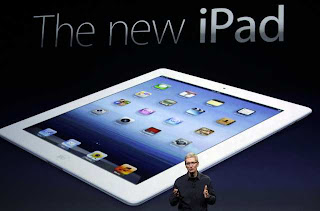


Specifications:
1. Models:
The New iPad comes in two different models, the one with Wi-Fi and the one with Wi-Fi and Cellular. The cellular companies that support the iPad are AT&T and Verizon. Only these two companies will support the Wi-Fi and Cellular iPad.
2. Size and Weight:
The New iPad has good dimensions and also is light. The size and weight are perfect and are listed as follows:
1. The height is 9.50 inches
2. The width is 7.31 inches
3. 0.37 inches in depth
4. The weight is 1.44 pounds

3. Storage:
Both iPad models come in 1. 16 GB
2. 32 GB
3. 64 GB
4. Display:
1. Retina Display
2. 9.7 inch Widescreen multi-touch display with IMS system.
3. 2048 by 1536 pixel resolution making it have a 264 pixel resolution per inch!
4. Supports multiple languages in display simultaneously
Chip:
The chip that is inside the New iPad is a Dual Core A5X Custom designed high performance with low battery usage on a chip with quad-core graphics
Wireless:
Has Wi-Fi and Bluetooth 4.0. The cellular models each have a different cellular system according to their carriers ( AT&T and Verizon )
Cameras, Video Recording, and Photos:
1. 5 megapixel camera
2. Autofocus
3. Face Detection in Images
4. Video Stabilization
5. Tap to focus
6. Video Recording in HD
7. FaceTime Camera ( webcam )
Battery And Power:
1. Built in 42 Watt chargeable battery
2. 10 hours of listening to music, watching videos, and surfing the web ; 9 hours on a cellular network on a cellular models
3. Charging with the USB cable that comes with the device and is compatible for charging with PC or with a wall adapter connected into a power socket.

The New iPad has proven to be a success all round because of it's awesome features and compatibility. These specifications make sure that one will have a great experience with this brand new device. If you have any other problems visit http://www.applehelpp.blogspot.com and if you still have any questions, feel free to comment.
Help was taken from http://www.apple.com/ipad/specs/
- Shahmeer
Jailbreaking iOS 5.1 - Step by Step Guide
iOS jailbreaking is crucial for the users
of Apple devices like iPhone, iPad, and iPod so as to gain the root access to
the operating system and thus get able to download additional apps, themes or
extensions, which is otherwise restricted. It is just like breaking free your
iOS from a jail. Now with the release of Absinthe 2.0 it is easy to jailbreak
iOS 5.1 on Apple iPad, iPhone or iPod. These new jailbreaks have full
compatibility with all iOS devices that are new.

Well jailbreaking iOS is kind of a risk
that you take as you have to mess up with the default setting of Apple devices.
But, if something goes wrong then you can put your device in DFU mode and
reload OS once again. As of jailbreaking the iOS 5.1 on Apple iPad, iPhone or
iPod, given below is the detailed procedure of achieving your purpose:

1. Firstly just remember that if anything
goes wrong after your jailbreak your device, you can put it on a mode known as
DFU and then reload the iOS for the device. It’s mandatory to know before you
start with something else.
2. Now, coming to the http://greenpois0n.com/ we can say that jailbreaking with it is a much simpler and easy
to know process that even tool old people or those who are not so tech-savvy
can do it. You just have to know about the steps that you need to follow.
3. So as to start with your first step go
to the Greenpoison website. When you access to the website then download the
Absinthe 2.0 from there for the iOS.
4. Now connect the device (iPhone, iPad
or iPod) that you wish to jailbreak to your PC. Open the iTunes menu and right
click on the device that you need to jailbreak. From there select the back up
in the menu. For a little while you will have to wait so that the backup is
finished in a proper manner. When it is all done you can close the iTunes.
5. Now erase all the content and settings
from your iOS device. In order to do that you just have to go to the ‘settings’
and then select ‘general’; in ‘general’ select the ‘reset’ option and then go
for ‘Erase all content and settings’.
6. After removing the content and
settings from your iOS device you have to open the Absinthe 2.0 on the OC and
then detect the iOS device. Once the device has been identified and detected
then you click on the jailbreak. The jailbreak process will start and take a
few minutes to complete.
7. When you have completed the jailbreak
process then you may close the Absinthe 2.0. Now launch again the iTunes and
right click on the device name that appears on itself. This time you have to
select ‘restore from backup’. By selecting the backup you can restore your iOS
device.
8. Do let your iOS device to restore and
finish syncing before you disconnect it from the PC. After the restore has
been completed you get the jailbroken iOS device. Add to it all the apps and
info that were in it before.
Following all these steps and taking the
help of Absinthe you can have fun with the kind of applications that you would
like to have on your iOS devices, be it iPad, iPod or iPhone. Later you can
thank Absinthe for fulfilling the purpose. Just remember the first step if
something goes wrong with your device after your jailbreak it.
How to increase System Performance-iPhone & iPod
After your device gets more than 5 months old your device
starts to slow down and is not as fast and smooth as it used to be in the
beginning. After one and a half years
the device starts to literally slow down and by slow down I mean that it does
not work properly and apps etc open slower than before. This means that your
system performance has decreased.
Most people do not tolerate slow speeds and the overall
experience with the certain device becomes negative. Slow system performance
also annoys and irritates many people. Apple devices are so expensive and when
they start to slow down or don’t act normal, they make their users think that
they have wasted their money. If you want to buy a new iPhone or iPod, buy them
from the sidebar at the right of this page. Those ones are trusted and are
guaranteed to work.

There are many different ways to make your device’s speed
faster and to make it function properly. Follow all of the advice that is given
below and your device will be as good as new.
1. Close all the
apps that are being multi-tasked by your device. Close all the multimedia that
is performing in the background.
2. For example,
if you have a device with a storage of 16 GB then make sure at least 3-4 GB is
still free and not occupied. The more memory that is used, the slower your
device will perform.
3. If your device
has been jailbreaked and has winterboard themes on it, reset the springboard or
change your theme. For the fastest performance, it is best if you remove a
theme as themes are usually the main things that bring problems for most devices.
4. Many people
like to keep many pages of their home screen full of apps. Some people arrange
their pages according to different categories. The truth is that the more pages
that your home screen has, the slower your device will become. It is
recommended that you don’t keep more than 3 pages.
5. After
jailbreaking your device it is commonly known that your device will slow down.
So if your device is too slow it is recommended that you restore your device so
that the jailbreak finishes and so that your device will back up and become faster.
Follow all the steps to increase your devices performance speed.
There will be no sudden change by applying any of the steps. Your device will
start to gradually speed up. Once you have followed most of the points, make
sure you restore your device so that the positive effect will become better.
For jailbreaking your device visit http://applehelpp.blogspot.com/2012/06/jailbreaking-cydia-installous-iphone.html
Advantages and Disadvantages of Jailbreaking
Everyone wants to jailbreak their iPhone or iPod for all those free apps, games and themes. If you want to know the steps of a jailbreak, go to http://applehelpp.blogspot.com/2012/06/jailbreaking-cydia-installous-iphone.html. Jailbreaking is a very big step towards your devices future. You should know the pros and cons or the advantages and disadvantages of jailbreaking.


Advantages ( Pros ):
1. Some apps that can be downloaded from the appstore are available like CyCorder and PDANet. These apps are very helpful.
2. Cydia and Icy are two unofficial app stores that allow you to buy different apps, themes and games absolutely free. This is only available to those who jailbreak their device. There will be many fantastic apps that the app store had rejected and they will work perfectly with your device.This gives you another choice and you can choose apps from the app store and from the third party app stores like Cydia.
3. Get various themes for your device that are not available anywhere on the app store! You can only get these themes from Cydia and other third party software. Apple already supplies you with a pretty good interface but to add the 'cool' into it you'll have to get your device jailbreaked. Then you can make your device interface into a snow leopard or a vending machine. You can add more customization to your device and make it to whatever you want to! You can through this also add an additional dock and get new sounds for your device making it more like how you want your device!
Disadvantages ( Cons ):
1. Your warranty will be dismissed. This is sad, but it's true, a jailbroken iPhone/iPod will lose it's warranty and apple will not support or entertain any hardware issues with your device if it is in warranty. This may seem harsh but you can easily get around it. If you use your iTunes to get a clean restore for your device, Apple will not be able to identify if the device is jailbroken or not!
2. Once after a jailbreak, if you update your devices software via iTunes, your jailbreak will be finished and all your apps that were received through a jailbreak will also be erased. But the Dev-Team usually updates it too in a couple of weeks, you won't get the new software on release date.
3. Another major thing is that your iPhone/iPod will become more unstable. Every software crashes in a while including iOS but after a jailbreak there is a more possibility of crashes. These crashes will not harm your device in any way and you can reset your device. Generally, your device will also slow down a little.
4. There is also a very slight chance that your device will brick or in other words, get ruined and it will be wasted. This possibility is very rare and only 1 in 10 000 users will experience it. The dev-team has made everything real safe and user friendly but there are always risks of your device to brick
Conclusion:
At the end of the day you will be thinking of either jailbreaking or not. If you ask me, I will say one MUST jailbreak his device to have the complete and the best experience of his/her iPhone/iPod. There are some cons, but the in overall, jailbreaking will be better. The cons are not too much of a problem, and you will be getting all the cool advantages if you jailbreak. For the procedure of a jailbreak, go to http://applehelpp.blogspot.com/2012/06/jailbreaking-cydia-installous-iphone.html
- Shahmeer
Best Apps and Games on the App Store
Once you get an apple account or jailbreak your device, you will want to use your account or jailbreak to the fullest and will want to get the best apps and games for your iPod or iPhone. I will list some of the popular apps and games that almost every apple user would want to have. If you want to learn how to jailbreak ( get free games and apps ) then go to http://applehelpp.blogspot.com/2012/06/jailbreaking-cydia-installous-iphone.html
The places where you can most likely find these apps and games are on the app store and installous. For some useful apps look at the list below.

The places where you can most likely find these apps and games are on the app store and installous. For some useful apps look at the list below.
Popular Apps:
1. Facebook, Twitter, and Google + apps. These are great apps if you want to social network from your device.
2. Football News, Cricinfo, and Basketball News for great sports updates according to the sport.
3. iFitness : Great app for keeping you fit including some great exercises.
4. CNN : The best news app. Get all the latest news from all over the world through this great app.
5. NetFlix : Want to watch movies? NetFlix will show you them but the movies are paid.
6. ImDb : Another great app for movies. Some movies are paid and others are free. This includes trailers.
7. Google Earth : It will give you everything related to maps and you can see the whole world and features.
8. Amazon : Online market for buying and selling. Everything can be sold or bought.
9. Photoshop Express : Edit your photos. Apply different sketches and add more features to your photo.
10. Skype : Free messaging and calling between skype accounts. The best IM app in the world!
11. Crackle : Watch movies absolutely for free!
12. Talking Tom : An awesome app that has a cat known as Tom. Tom will repeat whatever you say and will mock you. You can also play with Tom. A great little addicting app!
4. CNN : The best news app. Get all the latest news from all over the world through this great app.
5. NetFlix : Want to watch movies? NetFlix will show you them but the movies are paid.
6. ImDb : Another great app for movies. Some movies are paid and others are free. This includes trailers.
7. Google Earth : It will give you everything related to maps and you can see the whole world and features.
8. Amazon : Online market for buying and selling. Everything can be sold or bought.
9. Photoshop Express : Edit your photos. Apply different sketches and add more features to your photo.
10. Skype : Free messaging and calling between skype accounts. The best IM app in the world!
11. Crackle : Watch movies absolutely for free!
12. Talking Tom : An awesome app that has a cat known as Tom. Tom will repeat whatever you say and will mock you. You can also play with Tom. A great little addicting app!
The following are games that I personally like and recommend you to play them too.


Popular Games:
1. Traffic Rush
2. Topple 2
3. Angry Birds
4. Cube Runner
5. Fruit Ninja
6. Stunt Bike
7. Doodle Jump
8. Zen Bound
9. Space Ninja
10. Rolando 2
11. Pac Man
12. Need For Speed Shift
13. Pocket God
14. Geo Defense Swarm
15. Field Runners
16. Where's My Water
17. Cut The Rope
18. Infinity Blade II
19. Temple Run
20. Tap Glider
These are one of the best Apps and Games that you can find and install on your iPhone, iPod, or iPad. To get the most out of your device, try all these apps and then see which ones suit you!
- Shahmeer
16. Where's My Water
17. Cut The Rope
18. Infinity Blade II
19. Temple Run
20. Tap Glider
These are one of the best Apps and Games that you can find and install on your iPhone, iPod, or iPad. To get the most out of your device, try all these apps and then see which ones suit you!
- Shahmeer
Secret Feature Screenshot - iPhone, iPod, and iPad
Check out the video method:


These apple devices, the iPhone and iPod, they have lots of
secret features and today I am going to tell you about the feature of a
screenshot which can be taken through your device in a very simple procedure.
Lots of times we see certain things in our device being it
on the internet or anything else that we want to keep a record of it and don’t
want to lose it such as jailbreaking. You might want to save something during
the procedure and at that time you can take a screenshot of it.

Taking screenshots is not common to many people who own these devices. Screenshots are not
even mentioned in the User Manual. To take a screenshot you have to press the
sleep button ( on the top ) and the home button ( at the bottom middle ). Press
these two buttons exactly at the same time and your screen will blink. That
means you have taken the screenshot.
What do you have to do once you have taken the screenshot?
Now your screenshot has been saved in your ‘ Photos ‘ app in your device. All
your screenshots will be saved in a new album called ‘ Saved Photos ‘. Then you
can use these like any other photo.

This is the only way to record what is on your iPhone/iPod’s screen.
Subscribe to:
Comments (Atom)